I found the question below on http://www.forosdelweb.com/:
Tengo dos tablas relacionadas por el campo departamento.
en la primera el campo es clave y en la segunda no.
en la primera, los datos de ese campo son 1,2,3,4 y en la segunda tabla el departamento 4 no existe.
La pregunta es: obtener el nombre de los empleados y el nombre de los departamentos en los que trabajan,INCLUIR LOS DEPARTAMENTOS QUE NO TIENEN EMPLEADOS
select ename, deptno from emp;
The author has an EMP table and a DEPT table. The DEPT table has departments 1,2,3 and 4. The EMP table has employees in departments 1,2 and 3 but department 4 is empty. The requirement is to provide a list of ALL departments and the employees in each. I assume that an empty department should appear on one line with the employee name blank but that is not made clear.
I started by creating an EMP table as shown below. I put one employee in department 1, two in department 2 and three in department 3 although that was not a requirement of the problem. I left department 4 empty as requested):
SQL> create table emp
2 (deptno varchar2(2),
3 empname varchar2(10));
Table created.
SQL> insert into emp values ('1','Andrew');
1 row created.
SQL> insert into emp values ('2','Brian');
1 row created.
SQL> insert into emp values ('2','Colin');
1 row created.
SQL> insert into emp values ('3','David');
1 row created.
SQL> insert into emp values ('3','Elvis');
1 row created.
SQL> insert into emp values ('3','Finbar');
1 row created.
SQL>
Here is my DEPT table:
SQL> create table dept
2 (deptno varchar2(2),
3 deptname varchar2(10));
Table created.
SQL> insert into dept values ('1','Sales');
1 row created.
SQL> insert into dept values ('2','IT');
1 row created.
SQL> insert into dept values ('3','Finance');
1 row created.
SQL> insert into dept values ('4','Personnel');
1 row created.
SQL>
I can think of two ways to do this. The first one joins the two tables then uses a UNION to pick up the empty department:
SQL> col deptno format a6
SQL> select d.deptno, deptname, empname
2 from dept d, emp e
3 where d.deptno = e.deptno
4 union
5 select deptno, deptname, null
6 from dept
7 where deptno not in
8 (select distinct deptno from emp)
9 order by 1,3
10 /
DEPTNO DEPTNAME EMPNAME
------ ---------- ----------
1 Sales Andrew
2 IT Brian
2 IT Colin
3 Finance David
3 Finance Elvis
3 Finance Finbar
4 Personnel
7 rows selected.
SQL>
The second way uses an outer join:
SQL> select d.deptno, deptname, empname
2 from dept d, emp e
3 where d.deptno = e.deptno (+)
4 order by 1,3
5 /
DEPTNO DEPTNAME EMPNAME
------ ---------- ----------
1 Sales Andrew
2 IT Brian
2 IT Colin
3 Finance David
3 Finance Elvis
3 Finance Finbar
4 Personnel
7 rows selected.
SQL>
Monday, February 21, 2011


Saturday, February 19, 2011
Compressed Tables (Part 1)
The examples in this post were done on Oracle 10 with a block size of 8192:
SQL> col value format a10
SQL> l
1 select value from v$parameter
2* where name = 'db_block_size'
SQL> /
VALUE
----------
8192
SQL>
You can create a table and check its size like this:
SQL> create table normal_table
2 as select * from dba_tables;
Table created.
SQL> ed
Wrote file afiedt.buf
1 select bytes from dba_segments
2* where segment_name = 'NORMAL_TABLE'
SQL> /
BYTES
----------
393216
SQL>
If you create a table in the same way but include the compress clause, the table will end up smaller:
SQL> create table compressed_table compress
2 as select * from dba_tables;
Table created.
SQL> select bytes from dba_segments
2 where segment_name = 'COMPRESSED_TABLE';
BYTES
----------
65536
SQL>
You can compress an existing table as follows:
SQL> alter table normal_table move compress;
Table altered.
SQL> select bytes from dba_segments
2 where segment_name = 'NORMAL_TABLE';
BYTES
----------
65536
SQL>
And this is how you can uncompress one:
SQL> ed
Wrote file afiedt.buf
1* alter table compressed_table move nocompress
SQL> /
Table altered.
SQL> ed
Wrote file afiedt.buf
1 select bytes from dba_segments
2* where segment_name = 'COMPRESSED_TABLE'
SQL> /
BYTES
----------
393216
SQL>
Monday, February 14, 2011
SIGN
The SIGN function evaluates a column, value or expression and returns -1 if it is negative, 0 if it is zero and 1 if it is positive. I tried to catch it out but failed:
TEST9 > sqlplus /
TEST9 > sqlplus /
SQL*Plus: Release 9.2.0.7.0 - Production on Mon Feb 14 17:28:45 2011
Copyright (c) 1982, 2002, Oracle Corporation. All rights reserved.
Connected to:
Oracle9i Enterprise Edition Release 9.2.0.7.0 - Production
With the Partitioning option
JServer Release 9.2.0.7.0 - Production
SQL> select sign(-5) from dual;
SIGN(-5)
----------
-1
SQL> select sign(-0) from dual;
SIGN(-0)
----------
0
SQL> select sign(0) from dual;
SIGN(0)
----------
0
SQL> select sign(+0) from dual;
SIGN(+0)
----------
0
SQL> select sign(6.3) from dual;
SIGN(6.3)
----------
1
SQL> select sign(-2.5 * -1.7) from dual;
SIGN(-2.5*-1.7)
---------------
1
SQL> select sign(-2 / -3) from dual;
SIGN(-2/-3)
-----------
1
SQL>
Calculating Square Roots and Powers
(All tests done in Oracle 9.)
You can calculate the square root of a numeric column value as follows:
TEST9 > sqlplus /
SQL*Plus: Release 9.2.0.7.0 - Production on Mon Feb 14 15:09:25 2011
Copyright (c) 1982, 2002, Oracle Corporation. All rights reserved.
Connected to:
SQL*Plus: Release 9.2.0.7.0 - Production on Mon Feb 14 15:09:25 2011
Copyright (c) 1982, 2002, Oracle Corporation. All rights reserved.
Connected to:
Oracle9i Enterprise Edition Release 9.2.0.7.0 - Production
With the Partitioning option
JServer Release 9.2.0.7.0 - Production
SQL> create table andrew as
SQL> create table andrew as
2 select 5 numeric_column from dual;
Table created.
SQL> select sqrt(numeric_column) from andrew;
SQRT(NUMERIC_COLUMN)
--------------------
2.23606798
SQL>
You can also supply a value directly to SQRT:
SQL> select sqrt(5) from dual;
SQRT(5)
----------
2.23606798
SQL>
According to some old course notes I had (dated 6th August 1990), Oracle returns a null if you try to calculate the square root of a negative number. This is no longer the case as Oracle simply returns an error message:
SQL> select sqrt(-1) from dual;
select sqrt(-1) from dual
*
ERROR at line 1:
ORA-01428: argument '-1' is out of range
SQL>
You can test the accuracy of a square root calculation by squaring the result and comparing the final answer with the original value. The power function will do this for you:
SQL> select sqrt(8) from dual;
SQRT(8)
----------
2.82842712
SQL> select power(2.82842712,2) from dual;
POWER(2.82842712,2)
-------------------
7.99999997
SQL>
The course notes also said that you could not do exponentiation to fractional powers.This restriction has been removed too:
SQL> select power(11,3/7) from dual;
POWER(11,3/7)
-------------
2.79454528
SQL> select power(2.79454528,7/3) from dual;
POWER(2.79454528,7/3)
---------------------
11
SQL>
Friday, February 11, 2011
CONN / AS SYSOPER in Windows XP
I was running Oracle on Windows XP and found I could not do CONN / AS SYSOPER:
C:\>sqlplus /nolog
SQL*Plus: Release 10.2.0.1.0 - Production on Fri Feb 11 23:44:21 2011
Copyright (c) 1982, 2005, Oracle. All rights reserved.
SQL> conn / as sysoper
ERROR:
ORA-01031: insufficient privileges
SQL>
I went to the Oracle 10 client software under All Programs and found the Administration Assistant for Windows under Configuration and Migration Tools (click to enlarge it and bring it into focus):
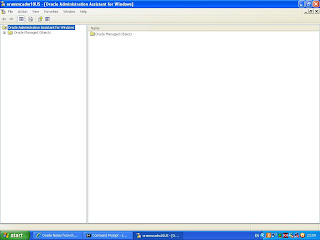


I wanted to CONN / AS SYSOPER from user Andrew so I highlighted it and then I could click on the Add button:


C:\>sqlplus /nolog
SQL*Plus: Release 10.2.0.1.0 - Production on Fri Feb 11 23:44:21 2011
Copyright (c) 1982, 2005, Oracle. All rights reserved.
SQL> conn / as sysoper
ERROR:
ORA-01031: insufficient privileges
SQL>
I went to the Oracle 10 client software under All Programs and found the Administration Assistant for Windows under Configuration and Migration Tools (click to enlarge it and bring it into focus):

I expanded it out as shown below and highlighted OS Database Operators - Computer:

I clicked on Action then Add/Remove:

This displayed the screen below:

I clicked the pull down arrow to the right of the Domain: box and selected the only choice displayed. This populated the Name / Description box:


Which added Andrew to the OS Database Operators - Computer box at the bottom:

So I clicked OK then I was able to do CONN / AS SYSOPER. When you do this, you log on as the PUBLIC user:
C:\>sqlplus / as sysoper
SQL*Plus: Release 10.2.0.1.0 - Production on Sat Feb 12 19:34:57 2011
Copyright (c) 1982, 2005, Oracle. All rights reserved.
Connected to an idle instance.
SQL> show user
USER is "PUBLIC"
SQL>
USER is "PUBLIC"
SQL>
Monday, February 07, 2011
sqlplus / as sysdba
In Oracle 9, you could not connect to a database using sqlplus / as sysdba:
TEST9> sqlplus / as sysdba
Usage: SQLPLUS [ [<option>] [<logon>] [<start>] ]
where <option> ::= -H | -V | [ [-L] [-M <o>] [-R <n>] [-S] ]
<logon> ::= <username>[/<password>][@<connect_string>] | / | /NOLOG
<start> ::= @<URI>|<filename>[.<ext>] [<parameter> ...]
"-H" displays the SQL*Plus version banner and usage syntax
"-V" displays the SQL*Plus version banner
"-L" attempts log on just once
"-M <o>" uses HTML markup options <o>
"-R <n>" uses restricted mode <n>
"-S" uses silent mode
TEST9>
I guess this was because there were spaces in the connect string but I’m not sure. A connect string without spaces did not cause a problem:
TEST9> sqlplus andrew/reid
SQL*Plus: Release 9.2.0.7.0 - Production on Mon Feb 7 17:10:25 2011
Copyright (c) 1982, 2002, Oracle Corporation. All rights reserved.
Connected to:
Oracle9i Enterprise Edition Release 9.2.0.7.0 - Production
With the Partitioning option
JServer Release 9.2.0.7.0 - Production
SQL>
There were at least 3 ways round this. You could surround the connect string with single quotes:
TEST9> sqlplus '/ as sysdba'
SQL*Plus: Release 9.2.0.7.0 - Production on Mon Feb 7 17:12:39 2011
Copyright (c) 1982, 2002, Oracle Corporation. All rights reserved.
Connected to:
Oracle9i Enterprise Edition Release 9.2.0.7.0 - Production
With the Partitioning option
JServer Release 9.2.0.7.0 - Production
SQL>
You could surround the connect string with double quotes:
TEST9> sqlplus "/ as sysdba"
SQL*Plus: Release 9.2.0.7.0 - Production on Mon Feb 7 17:16:05 2011
Copyright (c) 1982, 2002, Oracle Corporation. All rights reserved.
Connected to:
Oracle9i Enterprise Edition Release 9.2.0.7.0 - Production
With the Partitioning option
JServer Release 9.2.0.7.0 - Production
SQL>
Or you could use sqlplus /nolog then make the connection within SQL*Plus:
TEST9> sqlplus /nolog
SQL*Plus: Release 9.2.0.7.0 - Production on Mon Feb 7 17:20:01 2011
Copyright (c) 1982, 2002, Oracle Corporation. All rights reserved.
SQL> conn / as sysdba
Connected.
SQL>
In Oracle 10, the problem disappeared:
TEST10> sqlplus / as sysdba
SQL*Plus: Release 10.2.0.3.0 - Production on Mon Feb 7 17:23:57 2011
Copyright (c) 1982, 2006, Oracle. All Rights Reserved.
Connected to:
Oracle Database 10g Enterprise Edition Release 10.2.0.3.0 - 64bit Production
With the Partitioning, OLAP and Data Mining options
SQL>
sqlplus /nolog
This allows you to start a SQL*Plus session without connecting to a database:
TEST11>sqlplus /nolog
SQL*Plus: Release 11.1.0.6.0 - Production on Mon Feb 7 14:01:41 2011
Copyright (c) 1982, 2007, Oracle. All rights reserved.
SQL> SELECT SYS_CONTEXT('USERENV','DB_NAME') DATABASE
2 FROM DUAL;
SP2-0640: Not connected
SQL> SHOW USER
USER is ""
SQL>
Saturday, February 05, 2011
Stored Procedures and Roles (Example 1)
Tested on Oracle 10.2.0.1.0.
I do not understand why, but Oracle does not seem to recognise GRANTs made to roles when creating stored procedures. I do not believe this is a bug either as it has been the case for as long as I can remember. Perhaps one day I will raise a Service Request with Oracle for clarification. For now, here is an example to show what I mean. First, create a role:
SQL> conn system/manager@test10
Connected.
SQL> create role test_role
2 /
Role created.
SQL>
Next, create a user who will own a table:
SQL> create user john
2 identified by smith
3 default tablespace users
4 quota unlimited on users
5 /
User created.
SQL> grant create session,
2 create table to john
3 /
Grant succeeded.
SQL>
And another user who will access that table using a stored procedure:
SQL> create user fred identified by bloggs
2 /
User created.
SQL> grant create session,
2 create procedure,
3 test_role to fred
4 /
Grant succeeded.
SQL>
John logs in, creates a table and gives full access on it to the role:
SQL> conn john/smith@test10
Connected.
SQL> create table one_number
2 as select 1 counter from dual
3 /
Table created.
SQL> grant all on one_number to test_role
2 /
Grant succeeded.
SQL>
Fred logs in and tests the access through SQL*Plus:
SQL> conn fred/bloggs@test10
Connected.
SQL> select * from john.one_number
2 /
COUNTER
----------
1
SQL> update john.one_number
2 set counter = counter + 1
3 /
1 row updated.
SQL> select * from john.one_number
2 /
COUNTER
----------
2
SQL>
Fred tries to create a stored procedure to do the same thing. This fails but I do not know why:
SQL> create procedure add_one is
2 begin
3 update john.one_number
4 set counter = counter + 1;
5 end add_one;
6 /
Warning: Procedure created with compilation errors.
SQL> show errors
Errors for PROCEDURE ADD_ONE:
LINE/COL
--------------------------------------------------------------------------------
ERROR
--------------------------------------------------------------------------------
3/1
PL/SQL: SQL Statement ignored
3/13
PL/SQL: ORA-00942: table or view does not exist
SQL>
To make it work, John has to GRANT the access directly to Fred:
SQL> conn john/smith@test10
Connected.
SQL> grant all on one_number to fred
2 /
Grant succeeded.
SQL>
Then when Fred tries again, he succeeds:
SQL> conn fred/bloggs@test10
Connected.
SQL> create or replace procedure add_one is
2 begin
3 update john.one_number
4 set counter = counter + 1;
5 end add_one;
6 /
Procedure created.
SQL> show errors
No errors.
SQL> exec add_one;
PL/SQL procedure successfully completed.
SQL> select * from john.one_number
2 /
COUNTER
----------
3
SQL>
I do not understand why, but Oracle does not seem to recognise GRANTs made to roles when creating stored procedures. I do not believe this is a bug either as it has been the case for as long as I can remember. Perhaps one day I will raise a Service Request with Oracle for clarification. For now, here is an example to show what I mean. First, create a role:
SQL> conn system/manager@test10
Connected.
SQL> create role test_role
2 /
Role created.
SQL>
Next, create a user who will own a table:
SQL> create user john
2 identified by smith
3 default tablespace users
4 quota unlimited on users
5 /
User created.
SQL> grant create session,
2 create table to john
3 /
Grant succeeded.
SQL>
And another user who will access that table using a stored procedure:
SQL> create user fred identified by bloggs
2 /
User created.
SQL> grant create session,
2 create procedure,
3 test_role to fred
4 /
Grant succeeded.
SQL>
John logs in, creates a table and gives full access on it to the role:
SQL> conn john/smith@test10
Connected.
SQL> create table one_number
2 as select 1 counter from dual
3 /
Table created.
SQL> grant all on one_number to test_role
2 /
Grant succeeded.
SQL>
Fred logs in and tests the access through SQL*Plus:
SQL> conn fred/bloggs@test10
Connected.
SQL> select * from john.one_number
2 /
COUNTER
----------
1
SQL> update john.one_number
2 set counter = counter + 1
3 /
1 row updated.
SQL> select * from john.one_number
2 /
COUNTER
----------
2
SQL>
Fred tries to create a stored procedure to do the same thing. This fails but I do not know why:
SQL> create procedure add_one is
2 begin
3 update john.one_number
4 set counter = counter + 1;
5 end add_one;
6 /
Warning: Procedure created with compilation errors.
SQL> show errors
Errors for PROCEDURE ADD_ONE:
LINE/COL
--------------------------------------------------------------------------------
ERROR
--------------------------------------------------------------------------------
3/1
PL/SQL: SQL Statement ignored
3/13
PL/SQL: ORA-00942: table or view does not exist
SQL>
To make it work, John has to GRANT the access directly to Fred:
SQL> conn john/smith@test10
Connected.
SQL> grant all on one_number to fred
2 /
Grant succeeded.
SQL>
Then when Fred tries again, he succeeds:
SQL> conn fred/bloggs@test10
Connected.
SQL> create or replace procedure add_one is
2 begin
3 update john.one_number
4 set counter = counter + 1;
5 end add_one;
6 /
Procedure created.
SQL> show errors
No errors.
SQL> exec add_one;
PL/SQL procedure successfully completed.
SQL> select * from john.one_number
2 /
COUNTER
----------
3
SQL>
Go to example 2:
http://international-dba.blogspot.com/2011/06/stored-procedures-and-roles-example-2.html
Tuesday, February 01, 2011
KSDWRT
(Tested on Oracle 10.2.0.1.0)
With a parameter of 1, ksdwrt writes a message to a trace file in user_dump_dest:
SQL> exec sys.dbms_system.ksdwrt -
> (1, '*** Message to trace file ***');
PL/SQL procedure successfully completed.
SQL>
With a parameter of 2, ksdwrt writes a message to the alert log:
SQL> exec sys.dbms_system.ksdwrt -
> (2, '*** Message to alert log ***');
PL/SQL procedure successfully completed.
SQL>
With a parameter of 3, ksdwrt writes a message to a trace file AND the alert log:
SQL> exec sys.dbms_system.ksdwrt -
> (3, '*** Message to trace file and alert log ***');
PL/SQL procedure successfully completed.
SQL>
Now click on the screen print below (you may then also need to enlarge it to bring it into focus):

At the top is the trace file. Note that it contains both messages as they came from the same session.
At the bottom is the alert log, which also contains two messages. There is nothing else in it because I deleted the existing alert log before I started. Then, when I ran the SQL above, Oracle created a new one.
With a parameter of 1, ksdwrt writes a message to a trace file in user_dump_dest:
SQL> exec sys.dbms_system.ksdwrt -
> (1, '*** Message to trace file ***');
PL/SQL procedure successfully completed.
SQL>
With a parameter of 2, ksdwrt writes a message to the alert log:
SQL> exec sys.dbms_system.ksdwrt -
> (2, '*** Message to alert log ***');
PL/SQL procedure successfully completed.
SQL>
With a parameter of 3, ksdwrt writes a message to a trace file AND the alert log:
SQL> exec sys.dbms_system.ksdwrt -
> (3, '*** Message to trace file and alert log ***');
PL/SQL procedure successfully completed.
SQL>
Now click on the screen print below (you may then also need to enlarge it to bring it into focus):

At the top is the trace file. Note that it contains both messages as they came from the same session.
At the bottom is the alert log, which also contains two messages. There is nothing else in it because I deleted the existing alert log before I started. Then, when I ran the SQL above, Oracle created a new one.
Subscribe to:
Posts (Atom)